Copywriters swipe file (noun):
A thoughtfully and deliberatly curated collection of copywriting examples that inspire and help you approach your work from different directions. Advertisements, headlines, phrases, layouts, content ideas, jokes, turns of phrases, subject lines…whatever sparks ideas for your own work.
Plagiarism is using someone else’s work and calling it your own. That’s theft. (Your inner hamster judges this, harshly.)
Swipe files are like brainstorming without people. That’s research. (Your inner hamster appreciates this, muchly.)
Big difference.
Also: Learn more about your inner hamster.
Anything goes in your swipe file.
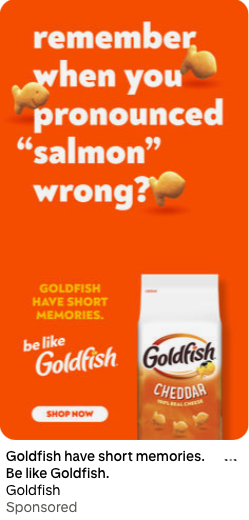
A swipe file is your pile of ideas that spark other ideas you’ll rework and rethink 100 ways to make your own thing. If it makes you feel something, it belongs in the file for your future self to reference (not to steal or repurpose).
- Websites, blog posts and webpages
- Landing pages
- Billboard phrases
- Jokes, puns, lyrics and idioms
- Design layouts
- Social media posts, images and ads
- Calls to action of both text link and button varieties
- Brochures, mailers and flyers
- Advertisements online and on paper
- Slogans you see on the side of a delivery box or on product packaging that make you think “oh, how clever, how has no one else thought of this before?”
I keep a collection of screen captures, saved images and a bookmarked folder of websites, ads and other goodies I find compelling. And I write down phrases I see or hear on sticky notes and in notebooks. And no, I never plagiarize. I still feel guilty for copying an encyclopedia article for a 6th-grade history paper.
Reference when your brain draws a blank.
Here’s the cold, hard truth. Sometimes your brain is too busy brimming with panic and you’ve neglected the care and feeding of your inner hamster, which leaves you high and dry when faced with a deadline and high expectations to turn out brilliant copy right. the. heck. now.
That’s when your swipe file swoops in to help fire up your thinking engines.
- Spark ideas. Not sure how to open that email sequence? Scroll through 10 high-converting openers and watch your brain fire up like a caffeinated squirrel.
- Show patterns. You’ll start noticing how great copy creates tension, solves pain points, or lands emotional punches.
- Keep you sharp. The more great copy you absorb, the better your internal editor becomes.
- Save time. Stop reinventing the wheel every time. Just study the wheel, upgrade it, and churn out what you need in record time.
You’re not copy-pasting. You’re learning what works and why—and building on it with your own flavor.
Collect, curate and study.
As you add each item, take five minutes to evaluate why.
- What caught your attention?
- How would you describe the tone and why?
- Who’s the audience and how does it hook them?
- What emotion does it make you feel?
- How is it structured?
- What are its weaknesses and drawbacks?
- Why is it worth being added to your swipe file?
Mix and match for best results.
Swipe a headline structure from one brand, a CTA style from another, and a voice quirk from a third. Combine, remix, and translate it for your purpose.
Rework, reword, rethink and re-explore other ideas. Make your end result the best (and most original) you can, based on best principles you see in your swipes.
Make your writing your own, always.
Magic happens when you take the principle behind a great piece of copy and apply it to your work. Not the words. The principle. Your resulting copy should never look like anything in your swipe file. Make it yours, informed by other bright ideas.
As in swipe a killer survival of the fittest idea from a construction industry magazine, base that emotion on a pun, and aim it at your fleet tracking subject matter. You’ve got something that stands out in the commercial fleet management crowd who’s tired of paying to replace lost things deployed over long terms of time.
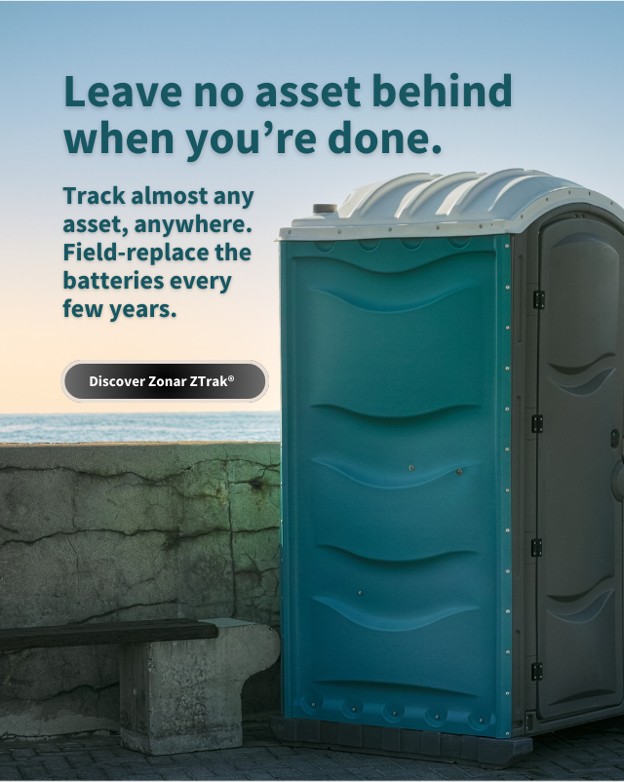
I wrote and concepted this ad for my employer.
My original featured the porta potty in a field.
Build and manage your swipe file.
Like paper? Prefer an app? Just cruising on your laptop? All good. Use what moves you.
- Pinterest: Offers a browser plugin for quickly adding images to a designated file in your Pinterest account.
- Google docs: Simple, searchable, and shareable. My coworkers love these.
- Evernote or Notion: Tag and organize by type, tone, emotion, or format. When I’m on my phone, I’m usually crushing candy in game I can’t remember the name of. But these are highly rated by other productive professionals.
- Screenshots folder: Great for mobile swipes and when you’re out and about in the real world (just label them unless you love mystery).
I once saw a billboard by a sewage and septic company Flowhawk that read “Your waste is our bread and butter.” Wish I hadn’t been driving so I could have written it down or taken a photo.
Use whatever works best for you. Just make it easy to reference later. The magic’s in the ease of use, convenience, and maintenance. No need to get too fancy.
See it. Swipe it. Study it.
If you’re doing anything creative professional without a swipe file (or some library of inspiration), your job is harder than it has to be. Fine artists look to the masters. Photographers look to other photographers. Dancers study their historical masters. And everyone learns from each other.

For copywriters, our brethren’s work is advertising, which happens to be out and about and everywhere we look.
I’m going to say this clearly: Copying and pasting someone else’s copy, changing three words, and passing off the result as your is gross. Don’t be that unethical person.
Build your swipe file. Study it. Learn from it. And then go write something that deserves to be swiped. Have fun. Enjoy. It’s one of the fun parts of what we do.
Swipe responsibly,
Your Ducky


 Rubber Ducky Copywriter
Share your thoughts